Philips · Health
Philips: Use-Error Analysis for IntelliVue Monitors, With More Than 1 Million in Use
Wrote the use scenarios and the use-error analysis for continuous temperature, SpO2 accessories with RFP, and patient management on the bedside monitor.
- Role
- Usability Engineer
- Scope
- IntelliVue patient monitoring usability engineering
- Focus
- Health
- Designer
 Gideon Awolesi
My contribution · Philips
IntelliVue patient monitoring usability engineering
Each uFMEA linked the use scenarios to the hazards, their severity, and the mitigations, and it went through cross-functional reviews before the risk file used it.
- 1M+
- IntelliVue monitors in use
- 3
- uFMEAs written and reviewed
- ~200
- uFMEA line items
What I owned
- 01Wrote the ContTemp use scenarios, from connecting the Temp Smart Cable to cleaning it.
- 02Took over the SpO2 accessories uFMEA, reviewed it row by row, and traced it to the sensor requirements.
- 03Analysed patient management on the monitor, from assigning a patient to transfer and merge.
Clickable prototypes
Open the Philips prototypes
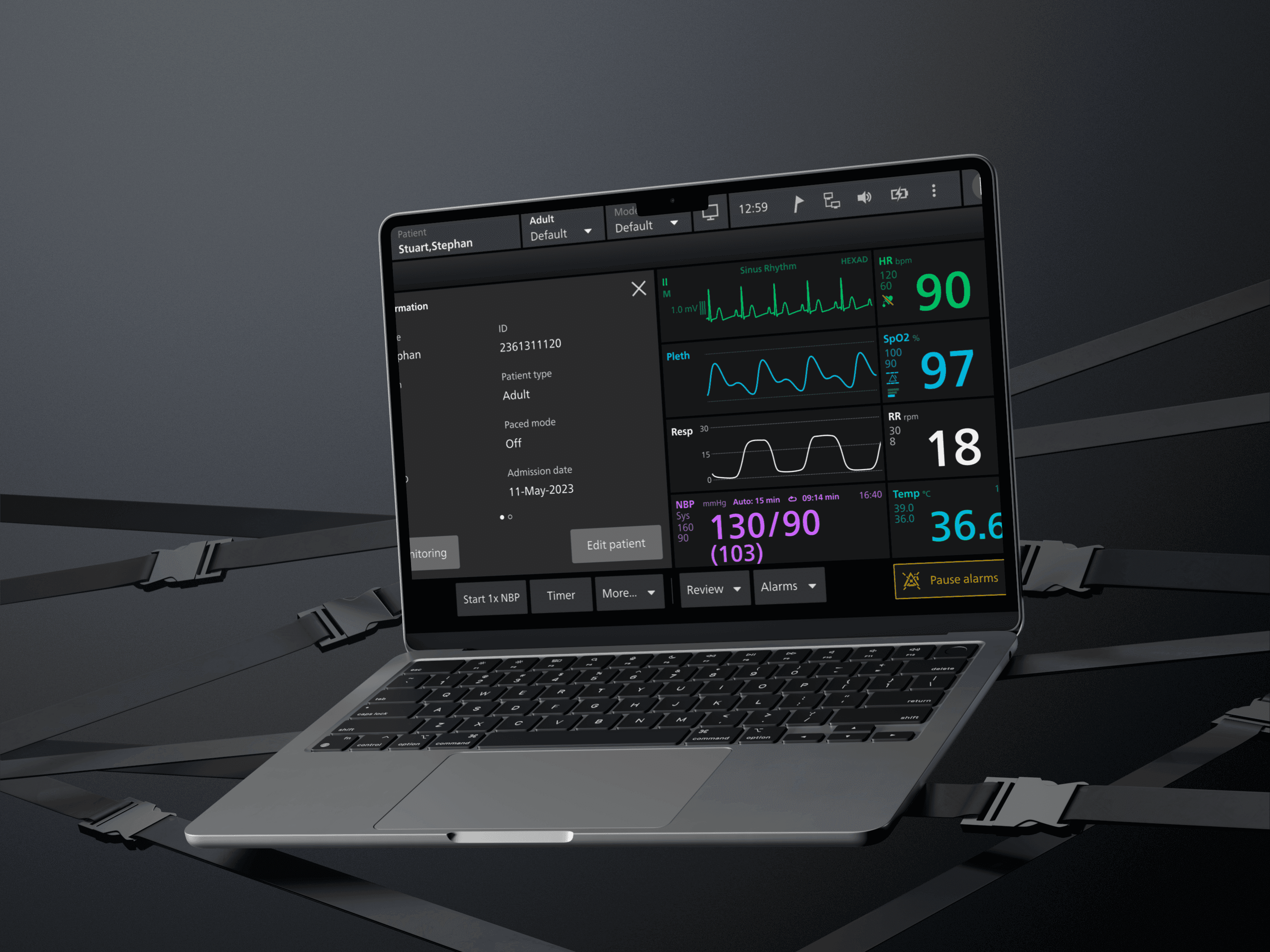
Each project has its own clickable patient monitor. Connect temperature probes, set SpO2 and RFP alarms, or assign a patient and dock a transport monitor.
Overview
About the project
Project overview
- Role: Usability engineer on Philips patient monitoring, from March 2025 to about October 2025.
- What Philips does: Philips makes the IntelliVue patient monitors that hospitals use at the bedside, and more than a million of them are in use. I worked on the Delta monitor programme. On Delta, a clinical user can be responsible for up to eight patients, and they use the monitor in emergencies and during transport. The monitor is one device among many around the patient, so it rarely has the user's full attention.
- What I worked on: I joined in March 2025 and took over the use scenarios and uFMEA drafts from the usability engineer before me. I worked through the projects in this order: the continuous temperature (ContTemp) smart cable, then the SpO2 smart cable and its accessories, and then patient management. For each one, I wrote the use scenarios as the steps a clinical user takes and walked them through with clinicians and the product owner. Then I wrote the use-error analysis (uFMEA) for the steps where a patient could be harmed. Across the three analyses, that came to about 200 line items.
I also wrote the use scenarios for Respiration From Pleth (RFP), a respiration rate the monitor derives from the SpO2 pleth signal. That work is in the SpO2 tab.
Prototypes
These were separate projects, so each one has its own tab below. Three of the tabs have an interactive prototype, and the fourth covers how the uFMEA work ran across all of them.
Each prototype follows the use scenarios and the mitigations in the uFMEA for that project. The prototypes run on sample patients, and they aren't Philips software. Where the source documents didn't include a unit or an alarm limit, the value in the prototype is illustrative.
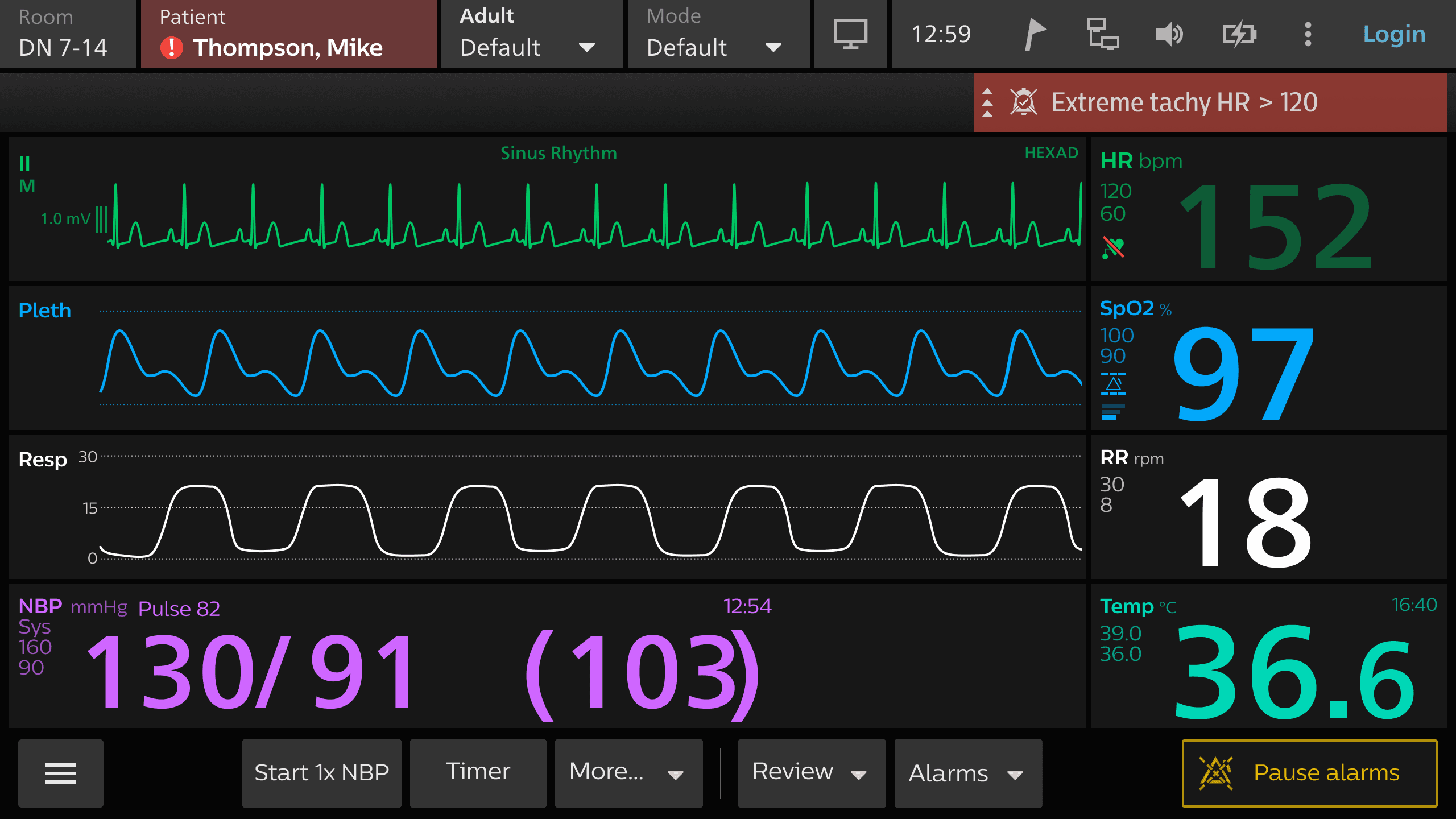
Continuous temperature through the Temp Smart Cable
Interactive prototype: Open the prototype. Try this: Connect a second temperature probe and watch the monitor rename both to Temp1 and Temp2. Then open Cleaning and record the cleaning of the cable.
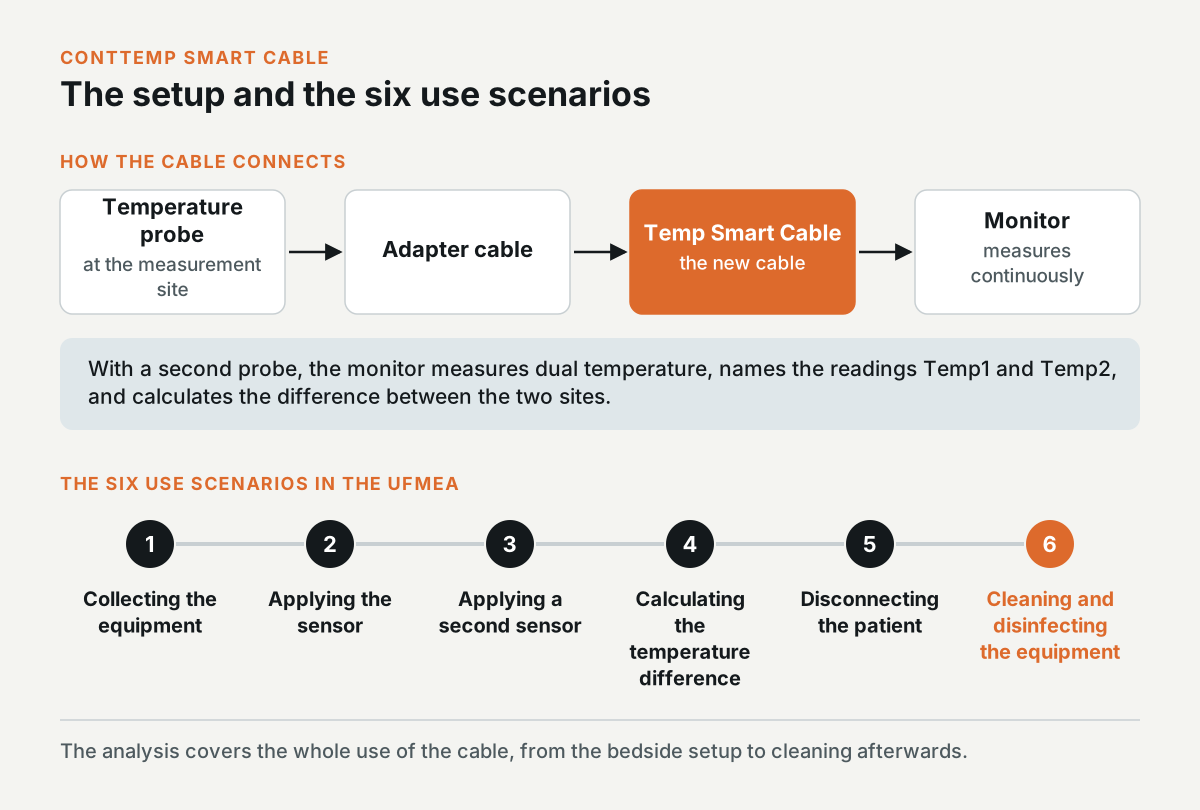
ContTemp measures temperature continuously through a new smart cable. The clinician connects a probe to an adapter cable, the adapter to the smart cable, and the smart cable to the monitor. With a second probe, the monitor measures dual temperature and calculates the difference between the two sites.
The uFMEA covered the whole use of the cable, from gathering the probes at the bedside to cleaning the cable afterwards. It had six use scenarios: collecting the equipment, applying the sensor, applying a second sensor, calculating the temperature difference, disconnecting the patient, and cleaning and disinfecting the equipment.
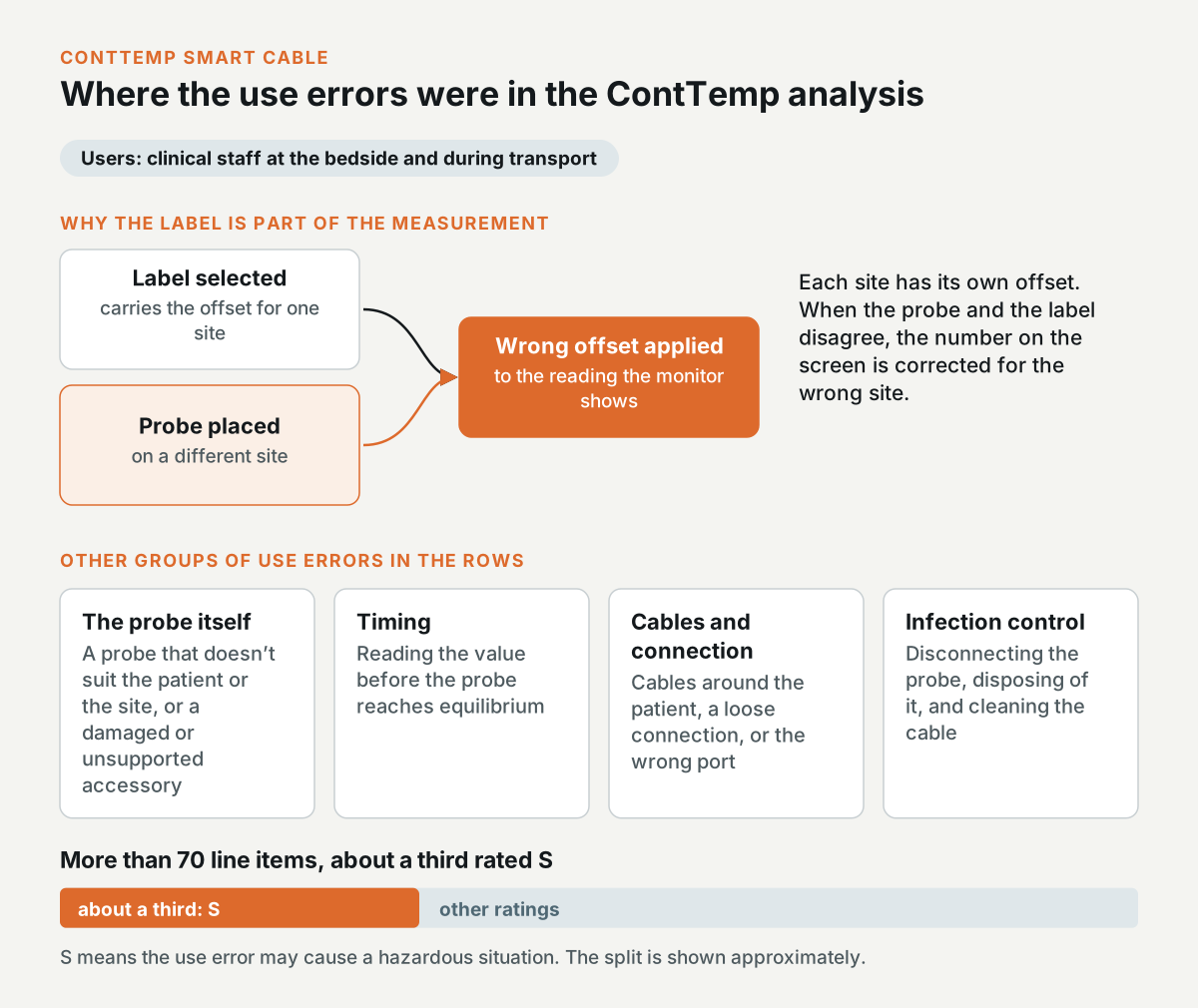
The use errors in the ContTemp analysis
In IEC 62366-1 terms, the users are clinical staff at the bedside and during transport. A lot of the hazard-related use errors were about the probe itself. A clinician could pick a probe that doesn't suit the patient or the measurement site, or use an accessory that's damaged or unsupported.
The label is part of the measurement, because each site has its own offset. If the clinician places the probe on a different site from the one in the label, the monitor applies the wrong offset to the reading.
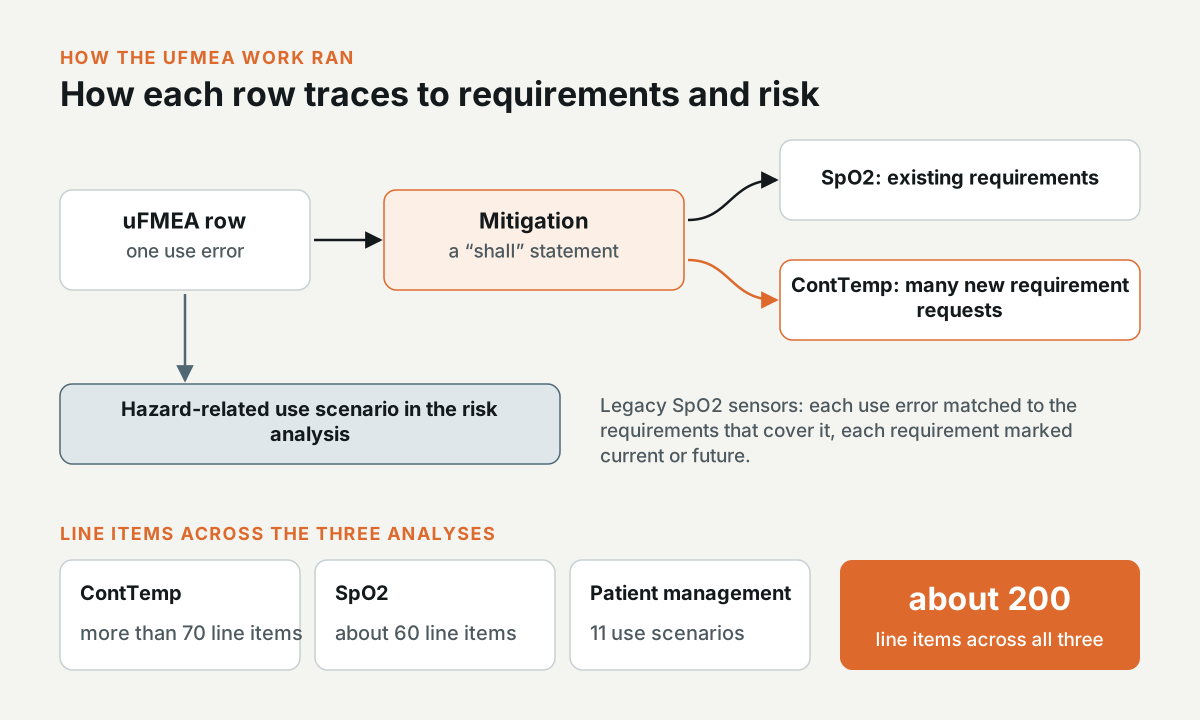
Other rows covered reading the value before the probe reaches equilibrium, cables around the patient, a loose connection or the wrong port, and infection control when the clinician disconnects the probe, disposes of it, and cleans the cable. The analysis has more than 70 line items, and about a third of them are rated S, which means the use error may cause a hazardous situation.
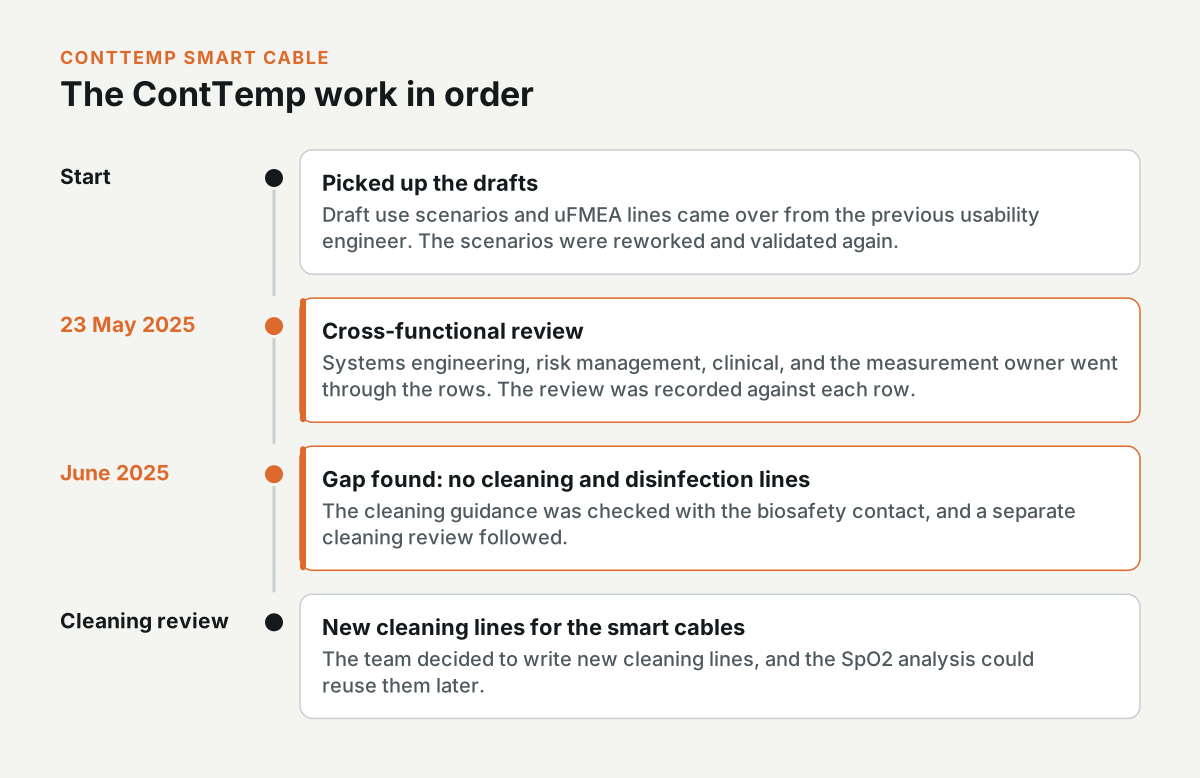
What I did on ContTemp
I picked up the draft use scenarios and uFMEA lines from the usability engineer before me. I reworked the scenarios and validated them again. On 23 May 2025, I ran the cross-functional review with systems engineering, risk management, clinical, and the measurement owner, and recorded the review against each row.
In June 2025, I found that the analysis didn't have any lines for cleaning and disinfection. I checked the cleaning guidance with the biosafety contact and then ran a separate cleaning review. In that review, the team decided to write new cleaning lines for the smart cables, and the SpO2 analysis could reuse them later.
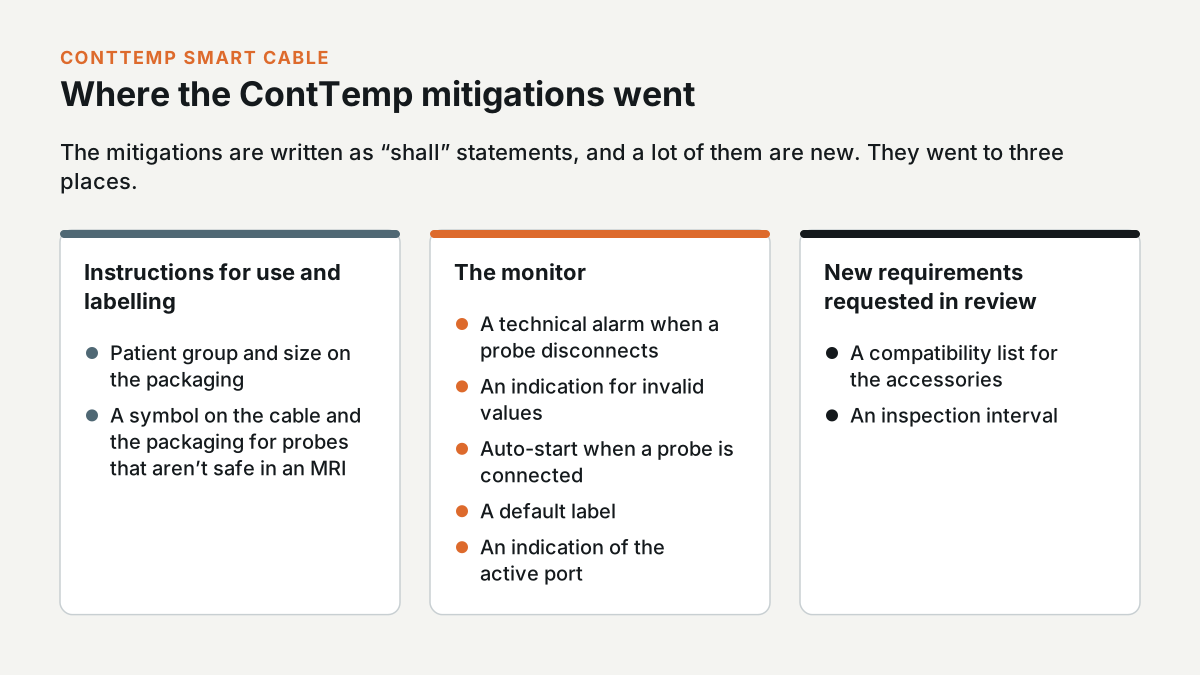
The mitigations are written as “shall” statements, and a lot of them are new. Some went into the instructions for use and the labelling, like the patient group and size on the packaging, and a symbol on the cable and the packaging for probes that aren't safe in an MRI. Others went into the monitor, such as a technical alarm when a probe disconnects, an indication for invalid values, auto-start when a probe is connected, a default label, and an indication of the active port. In the review, the team also requested new requirements, including a compatibility list for the accessories and an inspection interval.
Label conflicts and the proposed banner
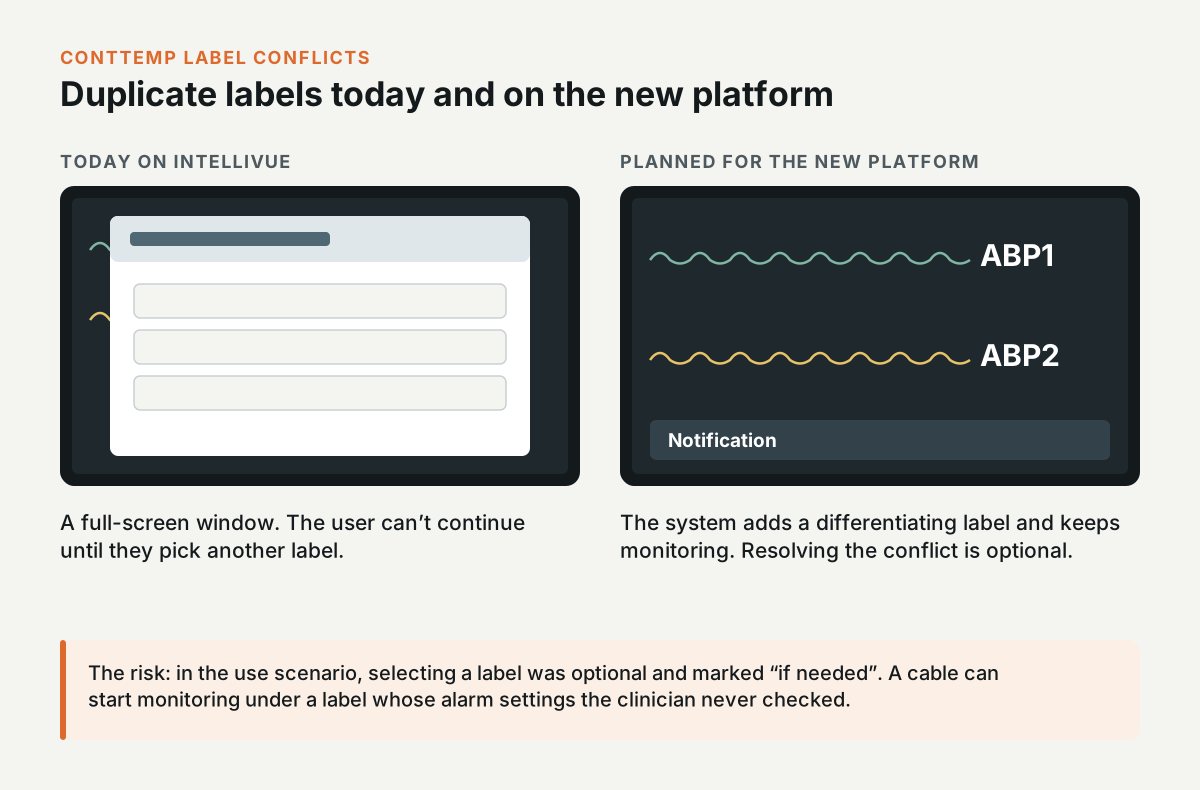
In August 2025, I went through the label behaviour with the owner of duplicate labels. In the use scenario, selecting a label was optional and marked “if needed”. This was a risk, because a cable can start monitoring under a label whose alarm settings the clinician never checked.
Right now, IntelliVue handles a duplicate label with a full-screen window, and the user can't continue until they pick another label. On the new platform, the plan was for the system to assign a differentiating label automatically, like ABP1 and ABP2, and keep monitoring. The clinician would get a notification, and resolving the conflict would be optional.
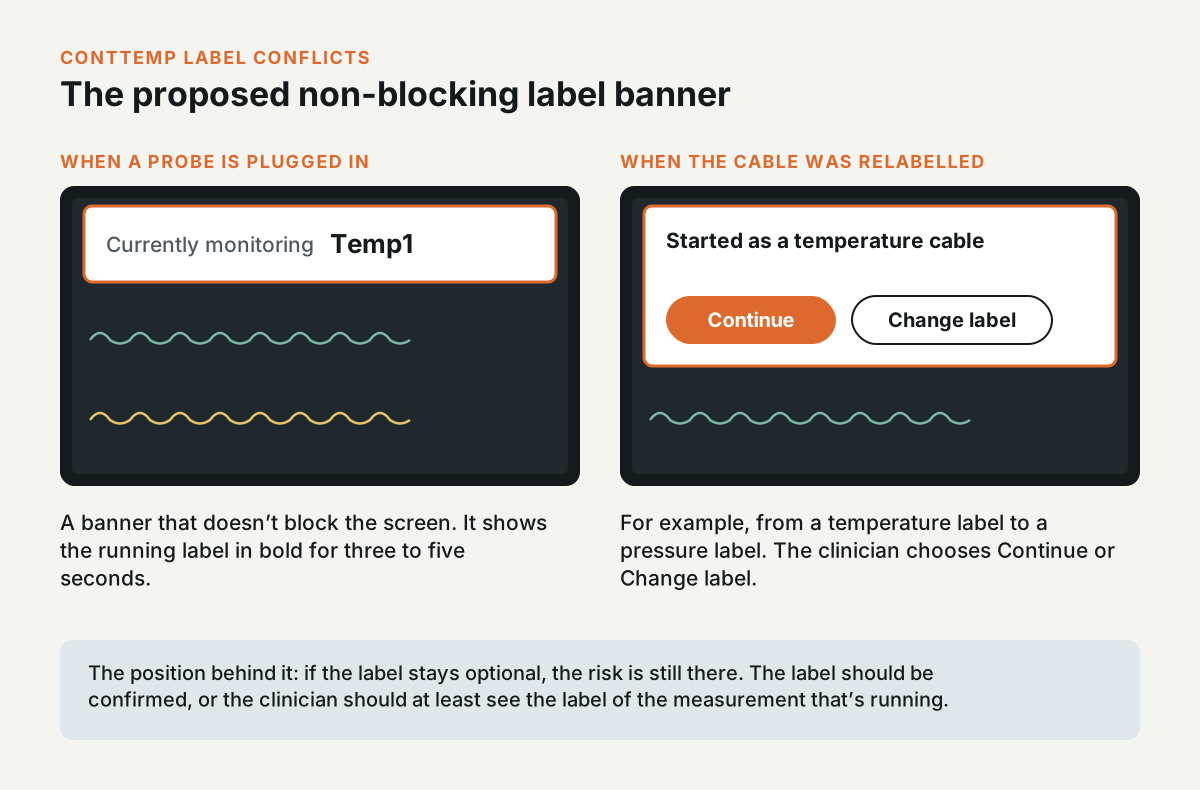
My position was that if the label is optional, the risk is still there, so the label should be confirmed, or the clinician should at least see the label of the measurement that's running. I proposed a banner that doesn't block the screen. When a probe is plugged in, the banner shows “Currently monitoring” and the label in bold for three to five seconds. If someone relabelled the cable, for example from a temperature label to a pressure label, the banner would show that it started as a temperature cable and offer Continue or Change label. I took the question to the measurement owner.
Where the ContTemp work ended
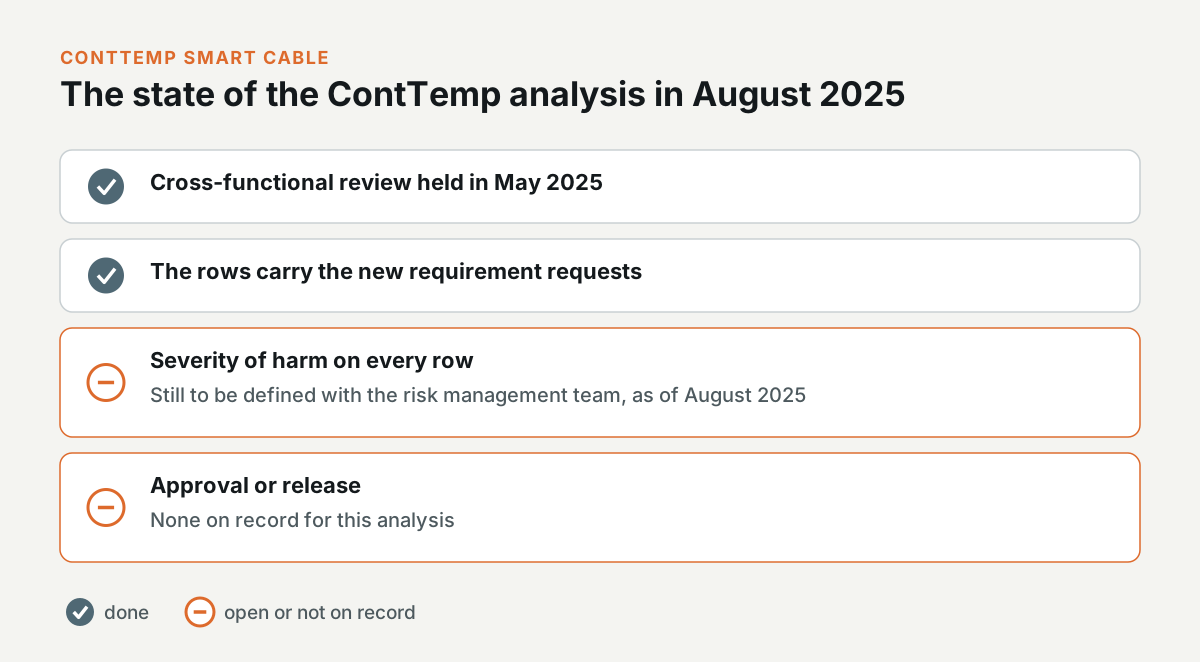
The ContTemp uFMEA went through its cross-functional review in May 2025, and its rows carry the new requirement requests. When I last worked on it in August 2025, the severity of harm on every row was still to be defined with the risk management team. I can't point to an approval or a release for it.
The SpO2 smart cable and its accessories
Interactive prototype: Open the prototype. Try this: Open SpO2 alarms and move the Desat limit, then set the patient category to Neonate and watch RFP become unavailable.
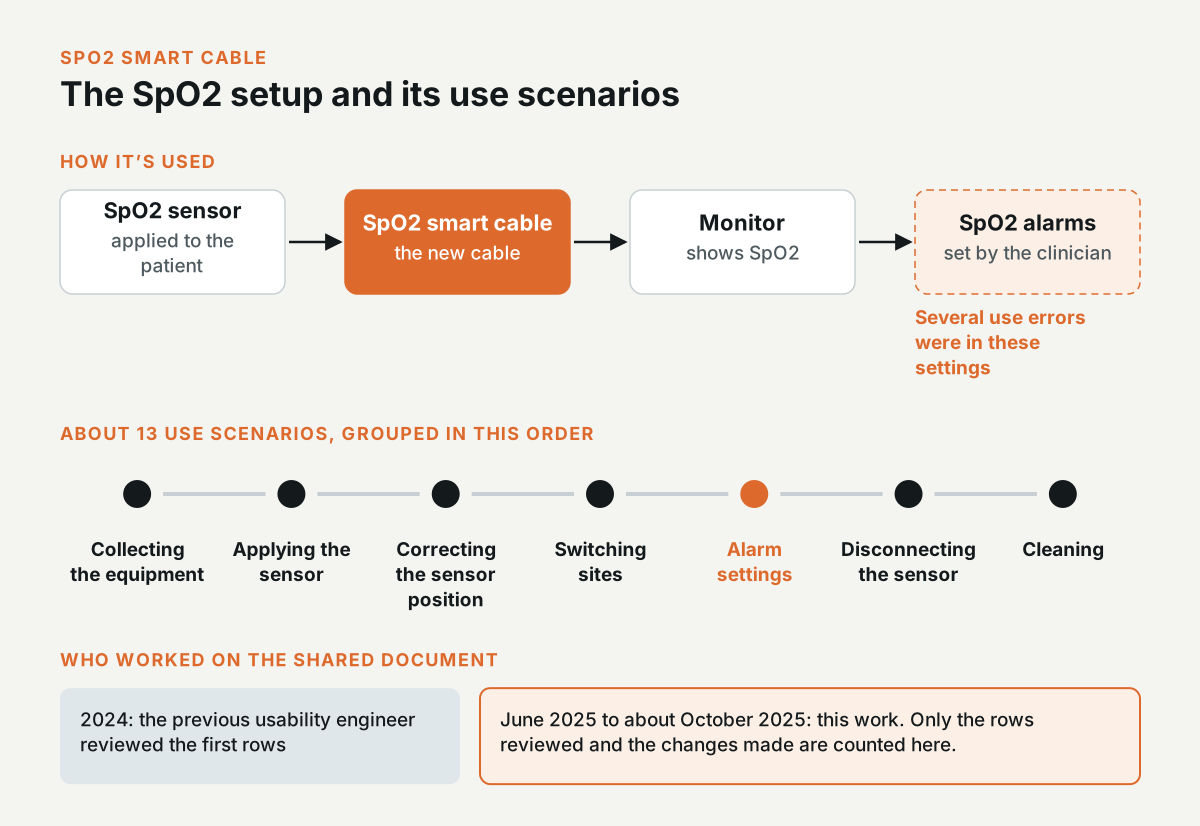
Clinical users apply an SpO2 sensor to the patient and connect it to the monitor through the new smart cable. They also set the SpO2 alarms, and several of the use errors were in those settings.
The usability engineer before me reviewed the first rows in 2024. I picked the analysis up in June 2025 and worked on it until about October 2025. It was a shared document, so I only count the rows I reviewed and the changes I made.
The analysis has about 13 use scenarios. They go from collecting the equipment and applying the sensor, through correcting the sensor position and switching sites, to the alarm settings, and then disconnecting the sensor and cleaning it.
The use errors in the SpO2 analysis
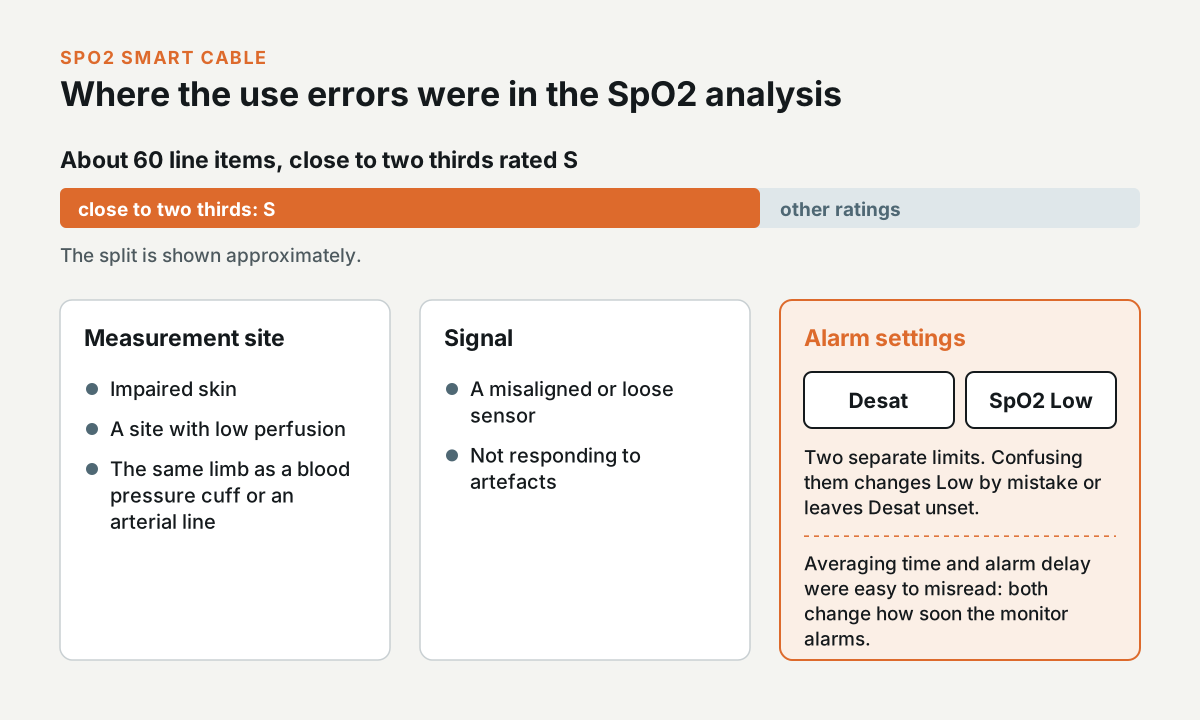
The analysis has about 60 line items, and close to two thirds of them are rated S. A lot of them are about the measurement site. A clinician could apply the sensor on impaired skin or on a site with low perfusion. They could also put it on the same limb as a blood pressure cuff or an arterial line. Others are about the signal, like a misaligned or loose sensor, or a clinician who doesn't respond to artefacts.
There were also use errors in the alarm settings. The Desat limit and the SpO2 Low limit are separate limits, and a clinician who confuses them can change the Low limit without meaning to, or leave Desat unset. The averaging time and the alarm delay were easy to misunderstand too, because both change how soon the monitor alarms.
What I did on SpO2
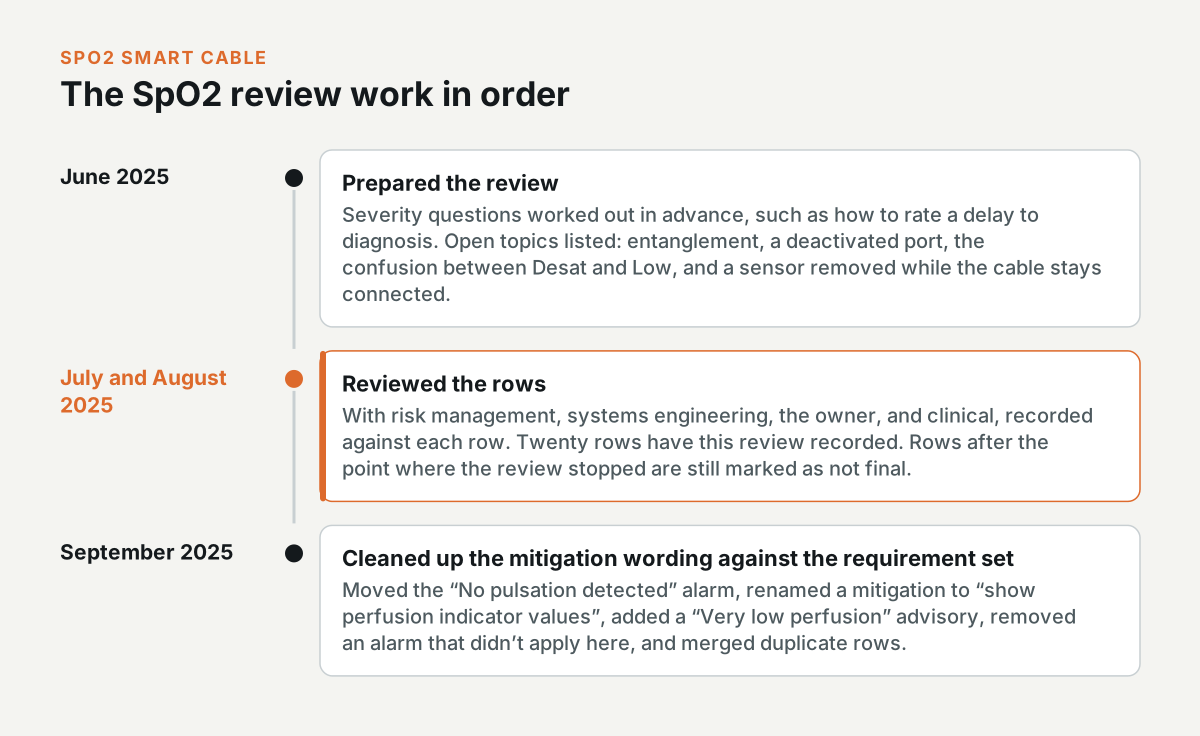
In June 2025, I prepared the review. I worked out the severity questions in advance, such as how to rate a delay to diagnosis, and listed the open topics, including entanglement, a deactivated port, the confusion between Desat and Low, and a sensor removed while the cable stays connected.
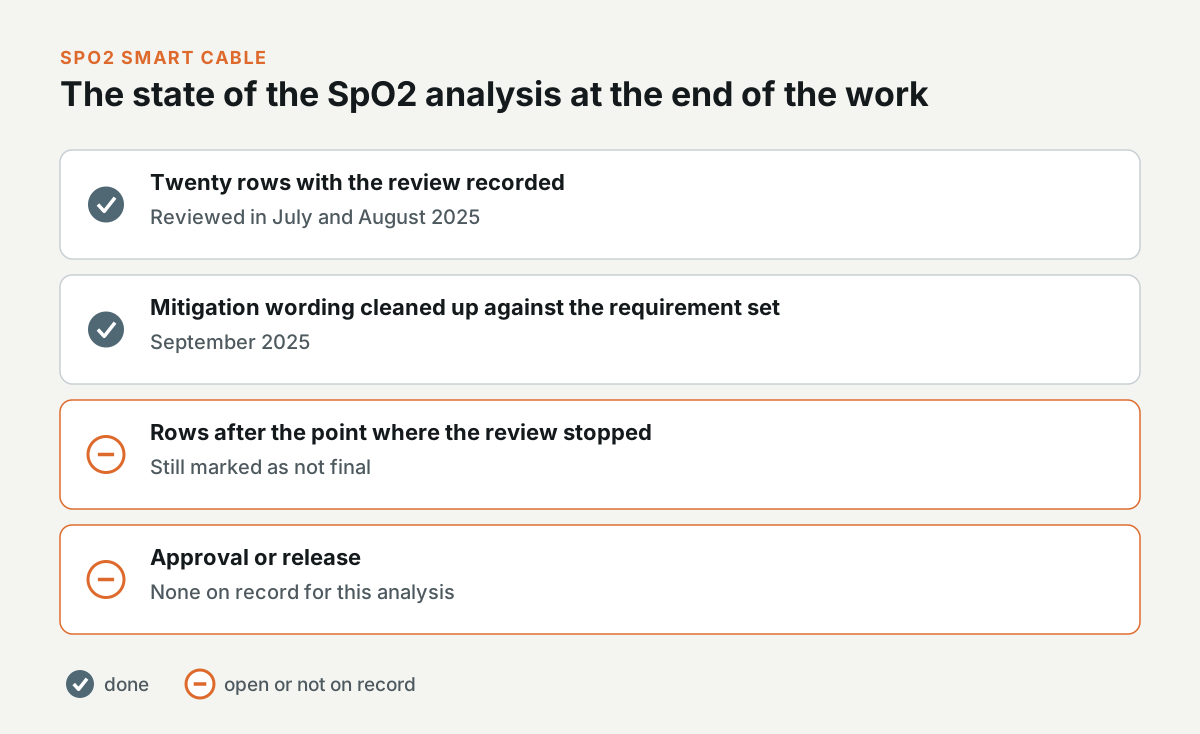
I then reviewed the rows with risk management, systems engineering, the owner, and clinical in July and August 2025, and recorded each review against the row. Twenty rows have my review recorded. The rows after the point where the review stopped are still marked as not final.
In September 2025, I cleaned up the mitigation wording against the requirement set. I moved the “No pulsation detected” alarm, renamed one mitigation to “show perfusion indicator values”, added a “Very low perfusion” advisory, removed an alarm that didn't apply in this context, and merged duplicate rows.
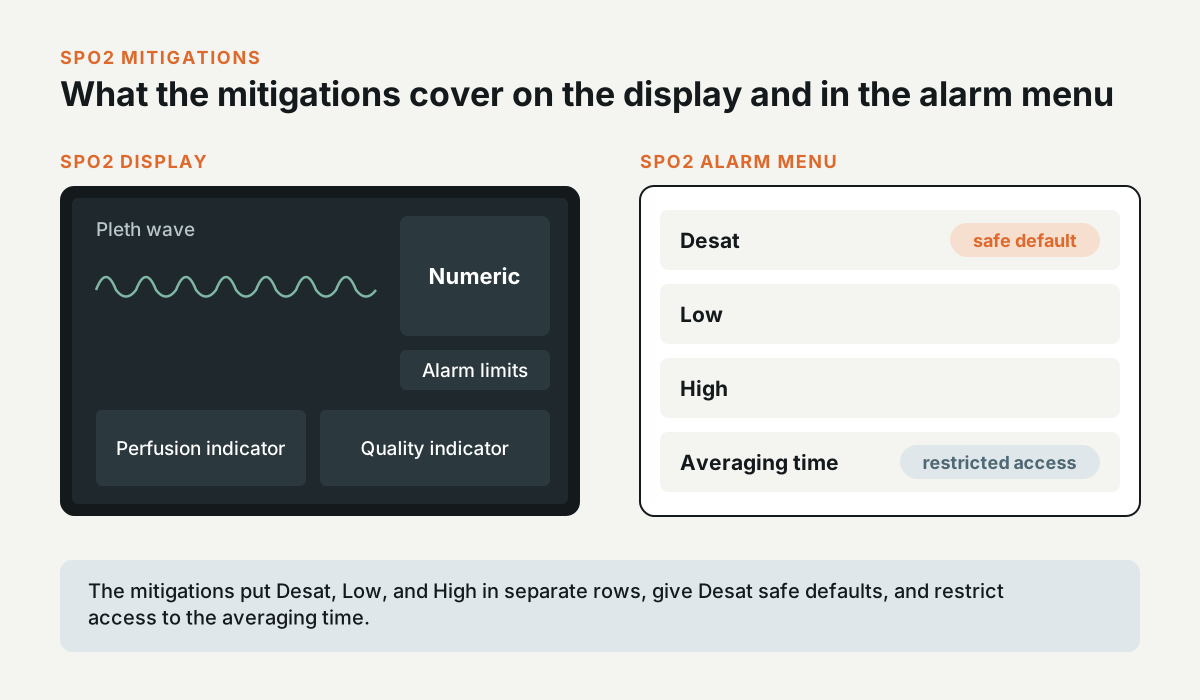
The mitigations cover the SpO2 display and the alarm menu. The display shows the pleth wave and the numeric, the alarm limits, a perfusion indicator, and a quality indicator. The alarm menu has separate Desat, Low, and High limits, with safe defaults for Desat, and the averaging time has restricted access.
Usability engineering for unchanged legacy sensors
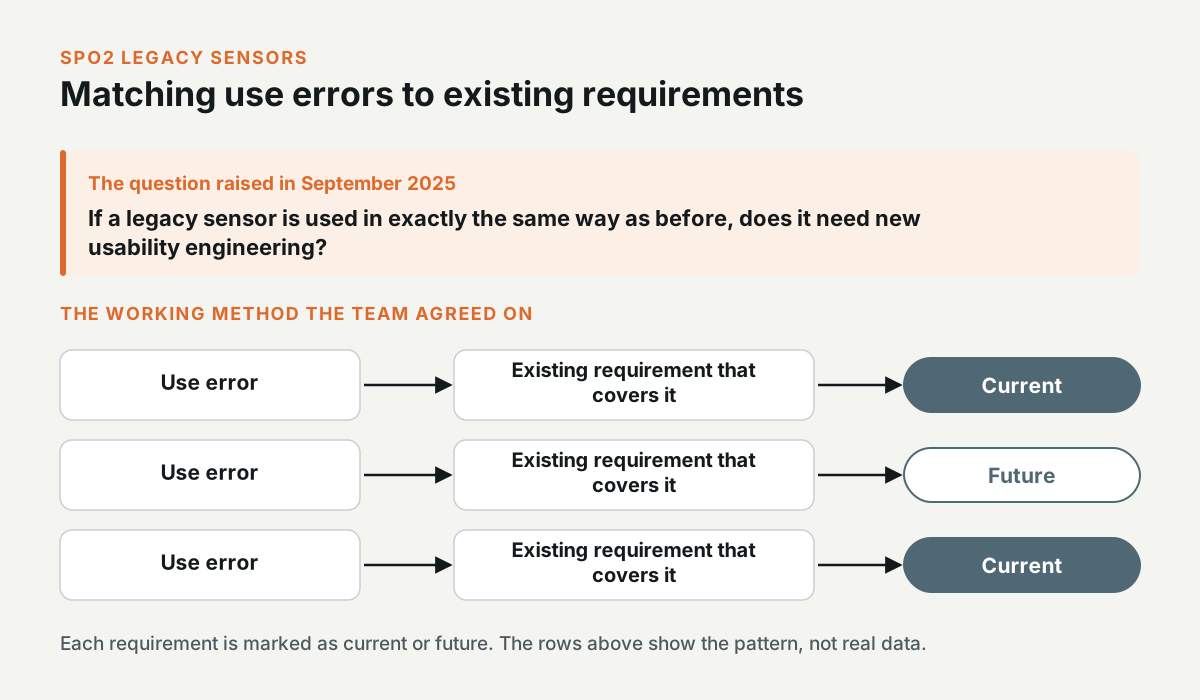
In September 2025, I raised a question with the team. If a legacy sensor is used in exactly the same way as before, does it need new usability engineering? The team agreed on a working method: match each use error to the existing requirements that cover it, and mark each requirement as current or future.
Respiration From Pleth (RFP)
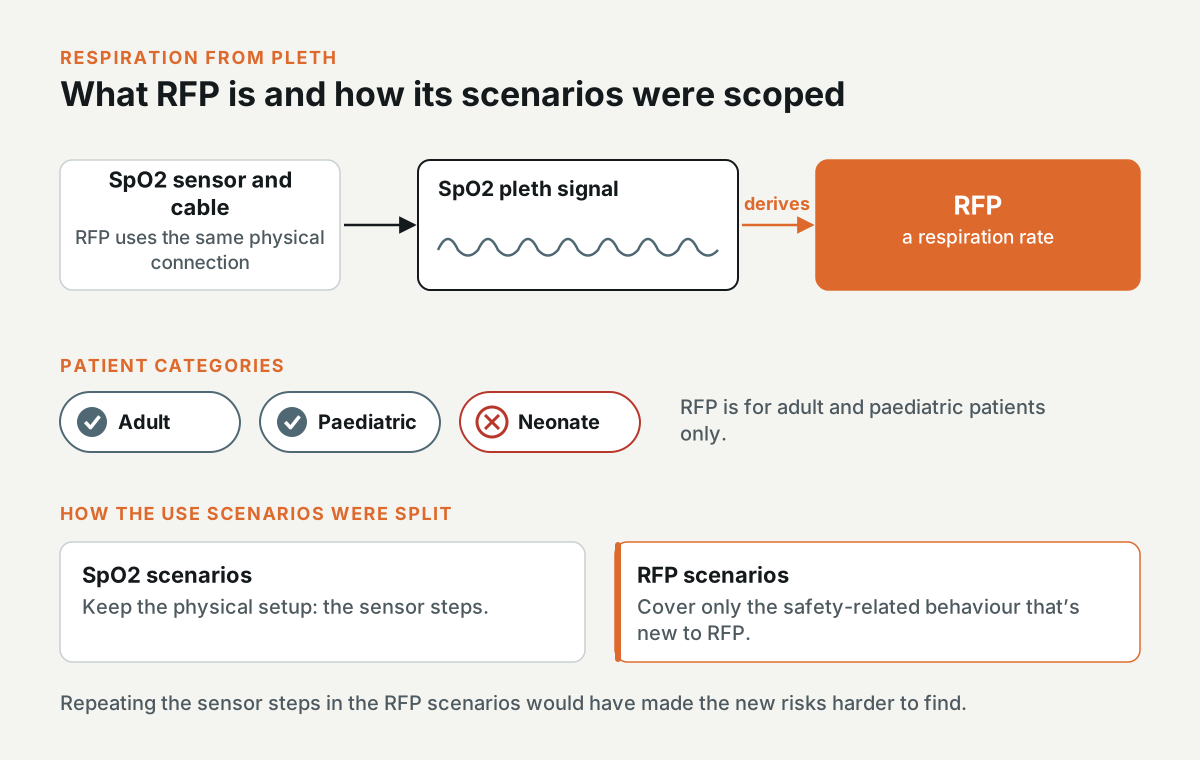
RFP is a respiration rate that the monitor derives from the SpO2 pleth signal. It uses the same physical connection as SpO2, and it's for adult and paediatric patients only.
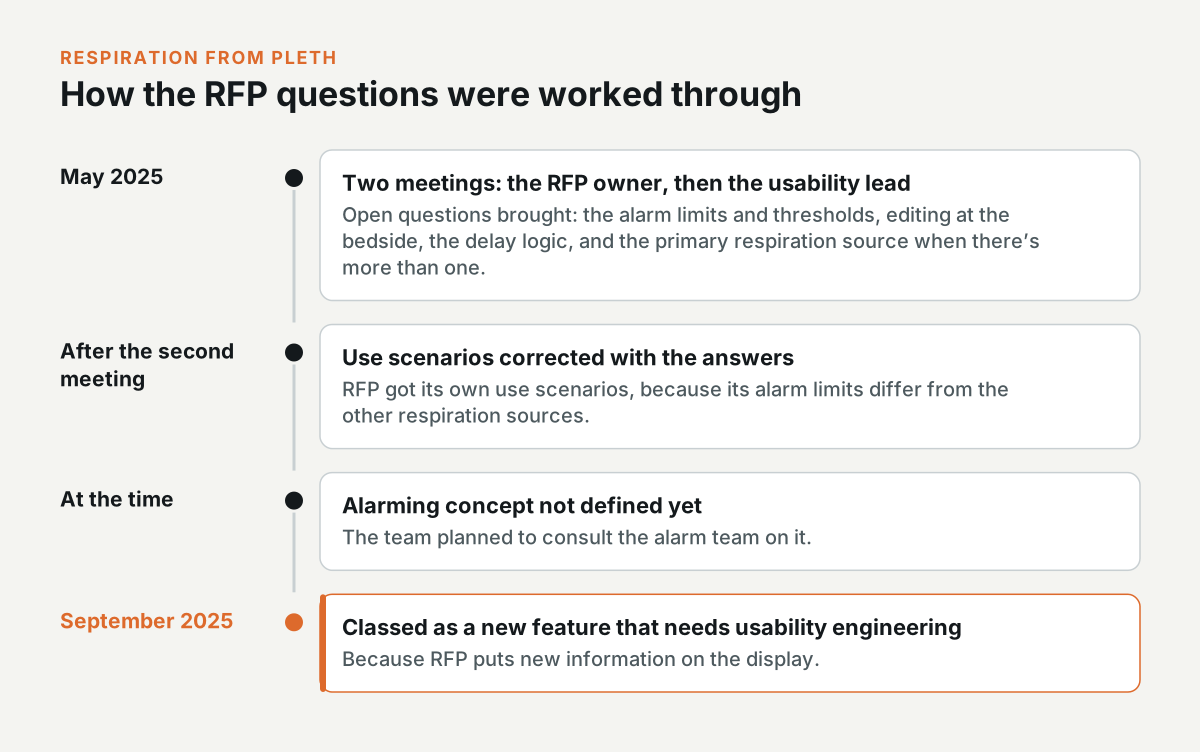
In May 2025, I went through RFP with its owner and then with the usability lead. I brought the open questions: the alarm limits and thresholds, editing at the bedside, the delay logic, and the primary respiration source when there's more than one. RFP needed its own use scenarios because its alarm limits differ from the other respiration sources. After the second meeting, I started correcting the use scenarios with the answers.
The physical setup stayed in the SpO2 scenarios, and the RFP scenarios only cover the safety-related behaviour that's new to RFP. If the RFP scenarios had repeated the sensor steps, the new risks would have been harder to find in the analysis.
At the time, the alarming concept for RFP wasn't defined yet, and the team planned to consult the alarm team on it. In September 2025, the team classed RFP as a new feature that needs usability engineering, because it puts new information on the display.
Where the SpO2 work ended
I can't point to an approval or a release for the SpO2 analysis.
Patient management on a monitor that travels with the patient
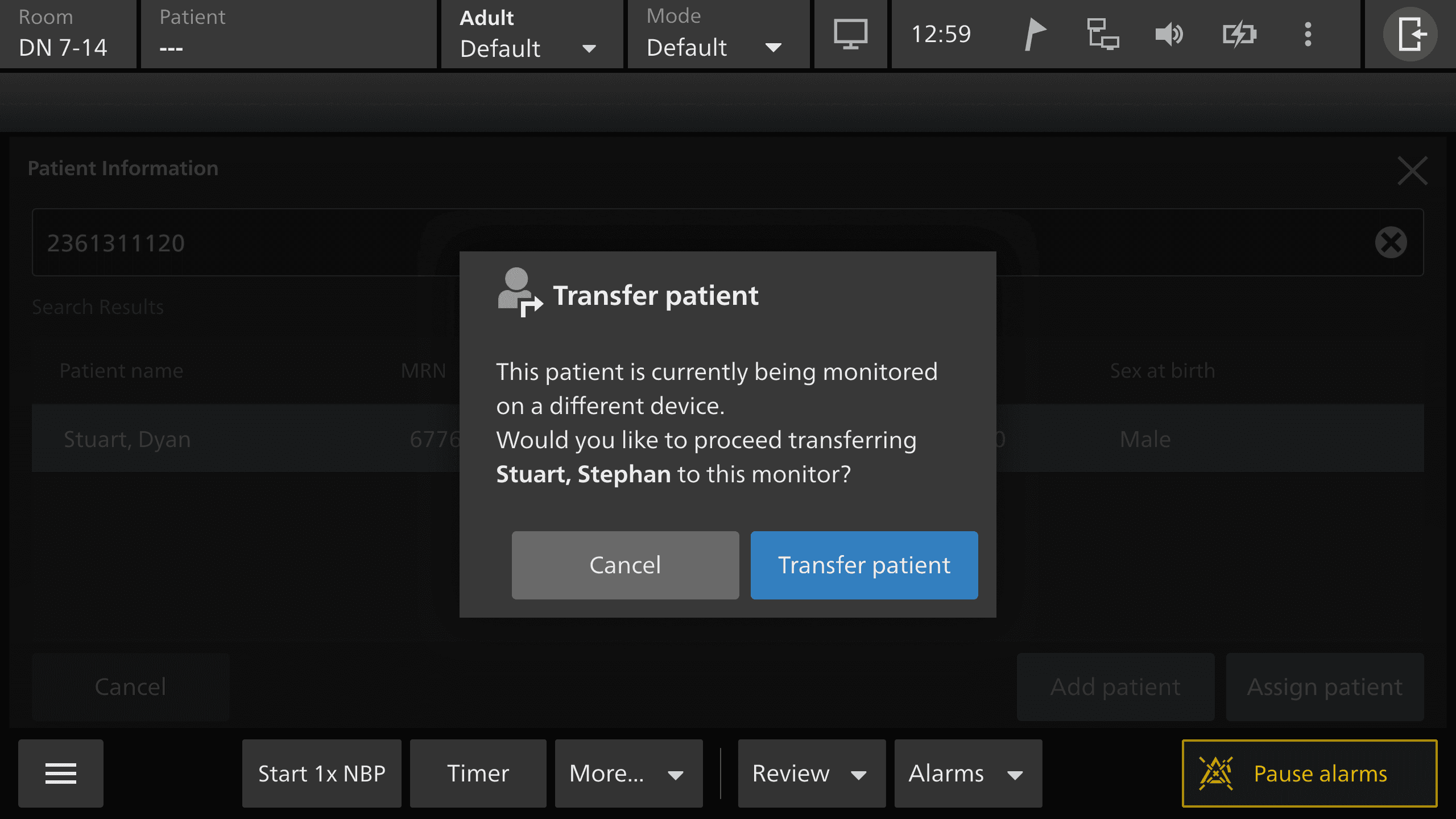
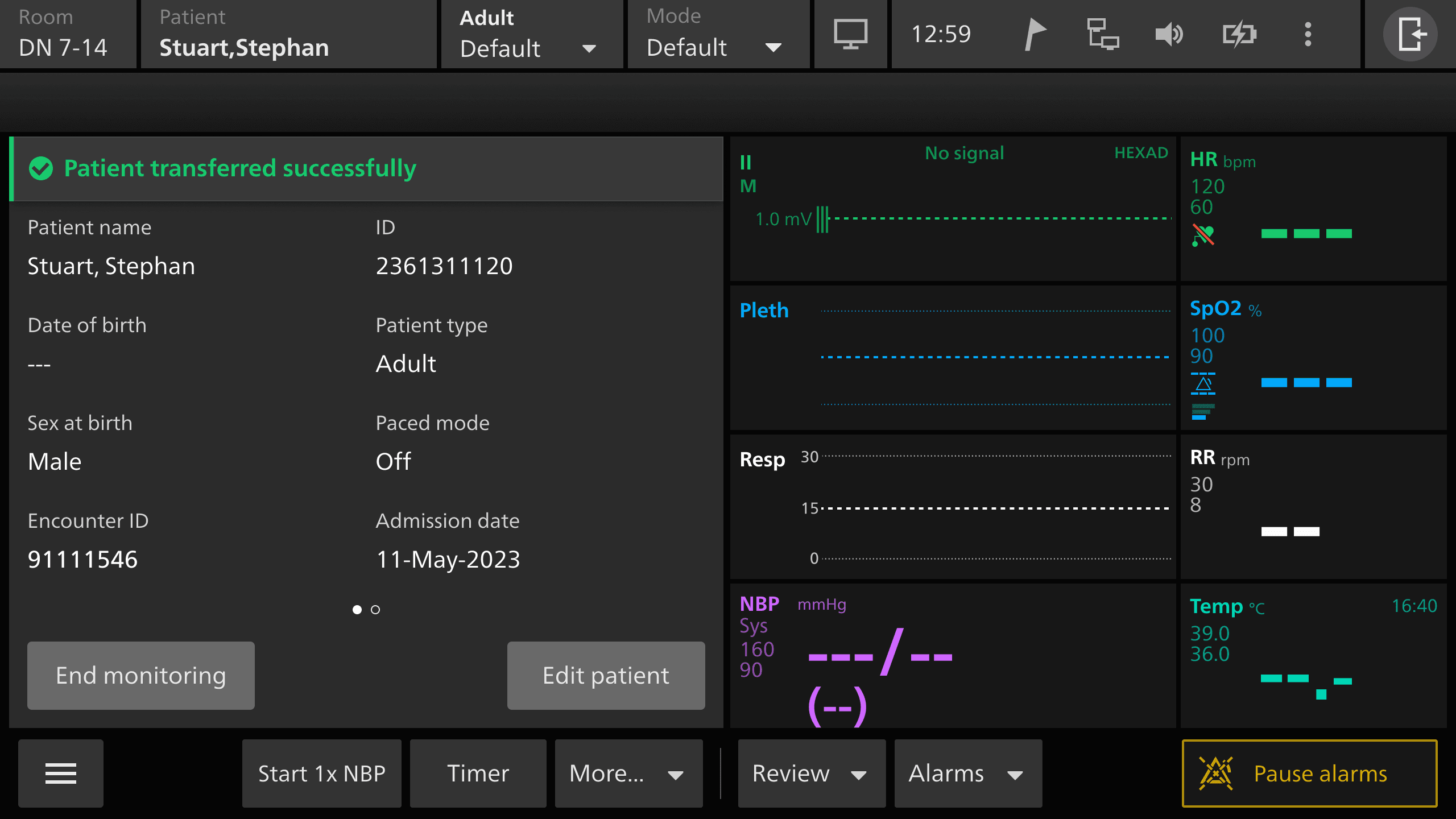
Interactive prototype: Open the prototype. Try this: Press Assign patient and find a patient by search, then dock the transport monitor and choose which data to keep.
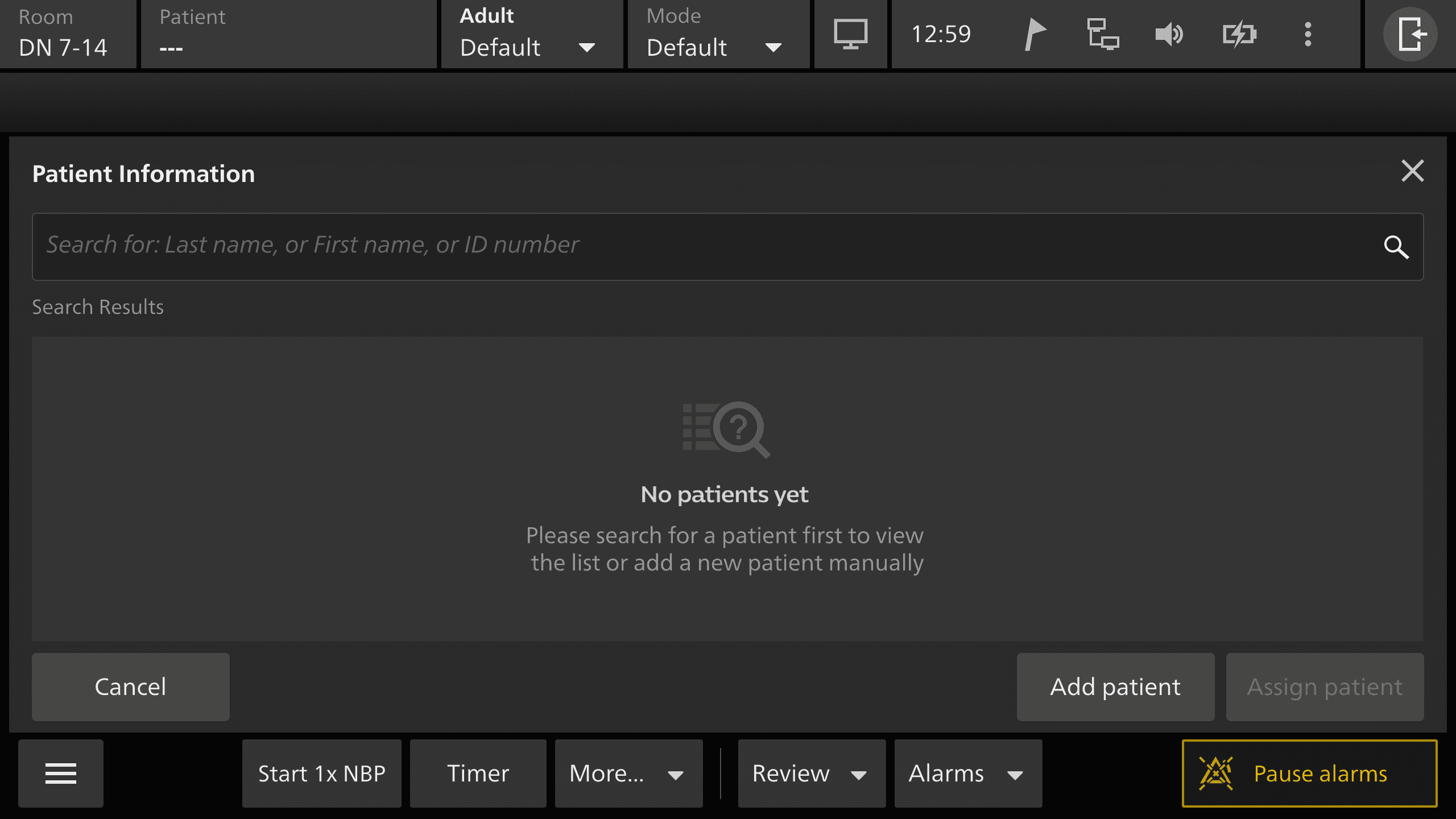
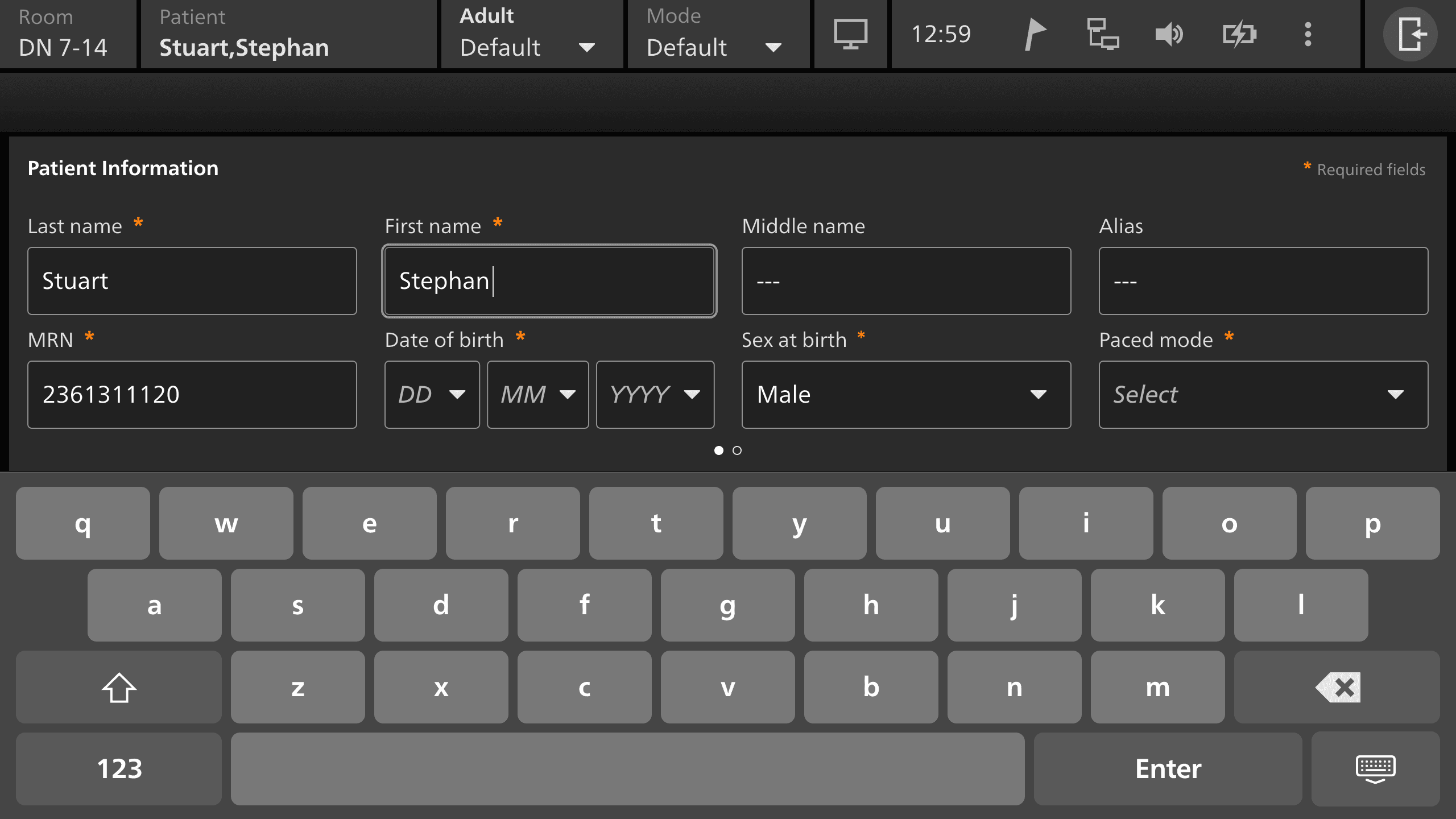
Patient management covers assigning a patient to the monitor, editing their details, unassigning them, finding them by search or by scanning a barcode or an RFID tag, switching the patient type, moving them to another monitor, and resolving a conflict when two patient records don't match. During the work, the team changed the term from “admit” to “assign”.
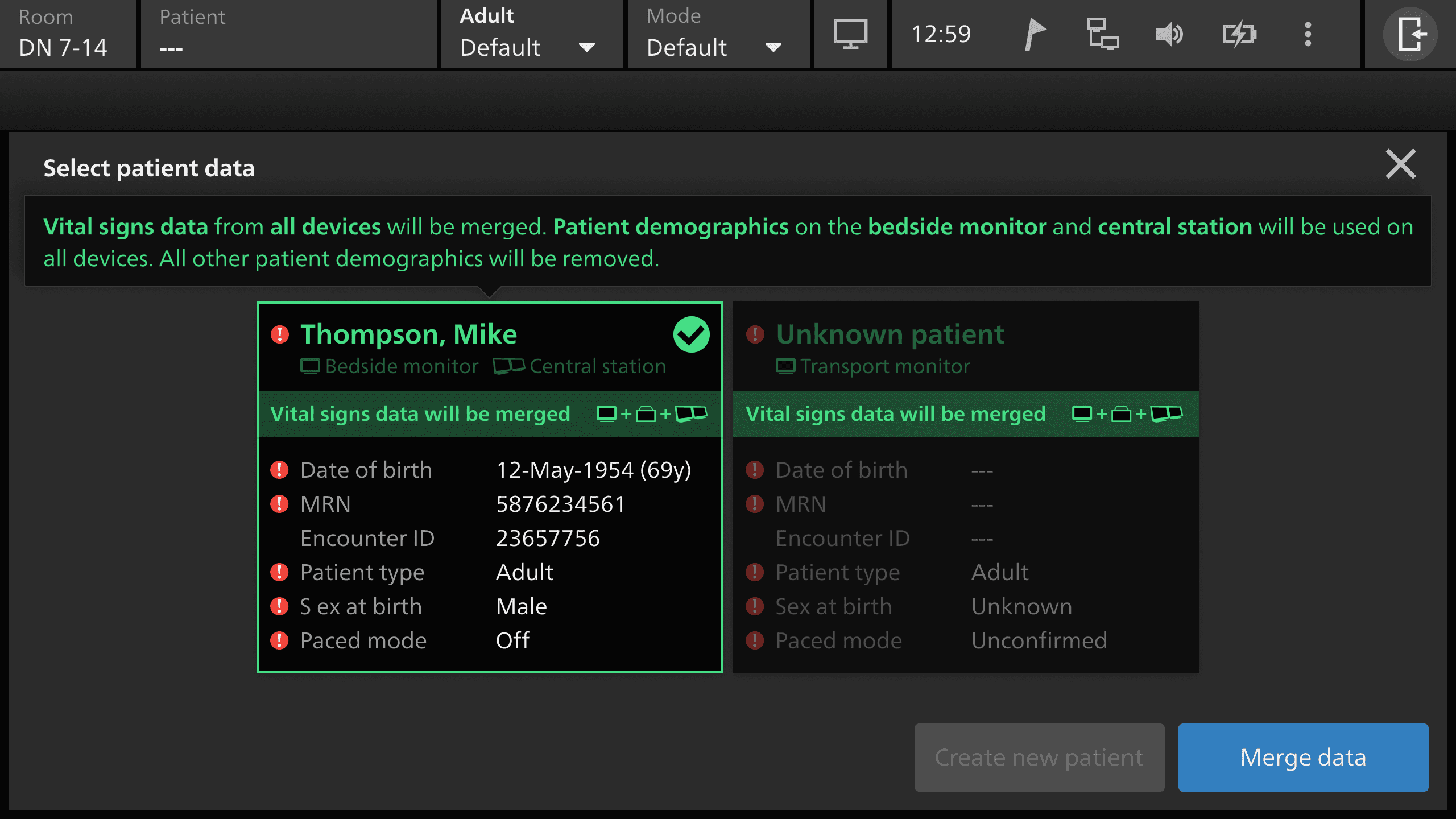
The monitor can travel with the patient, so a lot of the hazards are about the wrong patient or the wrong data. A clinician could assign the wrong person, pick the wrong patient type, which changes the formulas and the alarm limits, overwrite an existing record, leave alarms paused after transport, or choose the wrong data set when two records conflict.
What I did on patient management
The usability lead set up the workbook in March 2025, and an earlier usability engineer started the analysis. I took it over. In August 2025, I validated the main use scenarios with the product owner and the usability lead, and separated the scenarios the monitor handles on its own from the ones that need a central station.
In September 2025, I walked the transfer and conflict scenarios through with the product owner. I then wrote the failure modes for each step and classified the cause of each use error as perception, cognition, or action. I reviewed them with the cross-functional team in four sessions between 11 and 26 September 2025.
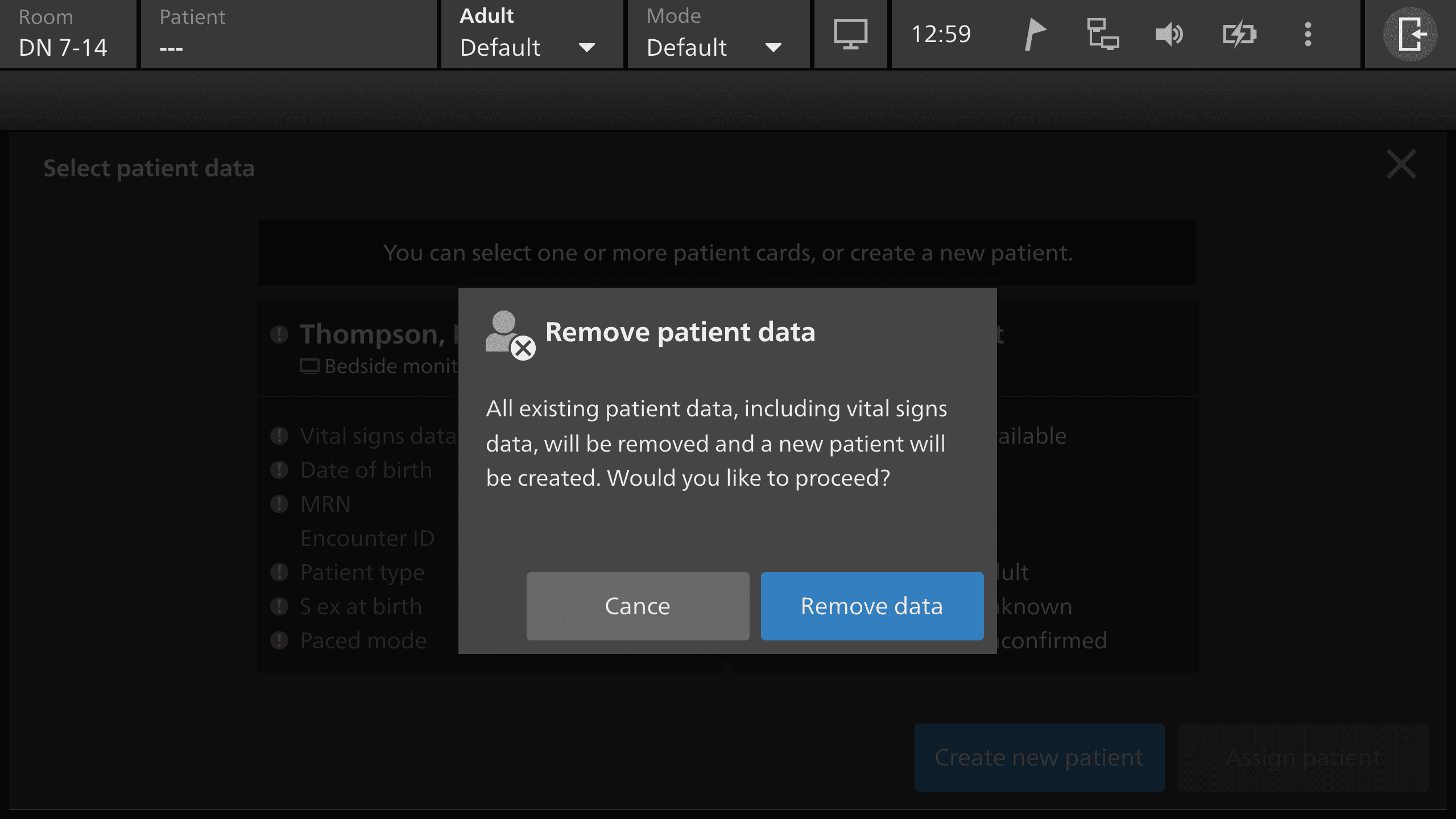
The workbook has 11 use scenarios and about 80 line items, and about two in five are rated S. The S-rated use errors include a typing error in the age, height, or weight, and the monitor then calculates wrong derived values, like the cardiac index. They also include choosing the wrong patient from the search results when the names are similar or the date of birth is misread, an edit the clinician expected to save automatically, an accidental unassign, and choosing New Patient when Continue was the right choice, which erases the existing data.
Mitigations in the patient management flows
The mitigations are design controls in the flow. The current patient's name and patient type are in the top bar. Manual entry ends on a summary page, and the clinician confirms the details there before the assignment completes. The form validates the input, so it rejects impossible values, like 31 February or a date of birth in the future.
Editing and unassigning both need a two-step confirmation, and the clinician can't leave the dialog without choosing confirm or cancel. Search results show the date of birth with the month in letters, like 05 MAR 1980, and the MRN and date of birth are never truncated.
The analysis also named design problems in the flows, like a destructive warning placed low on the screen, primary and secondary buttons with the same style, a truncated MRN and date of birth, and a verify step that wasn't part of the flow.
Keeping the analysis in scope
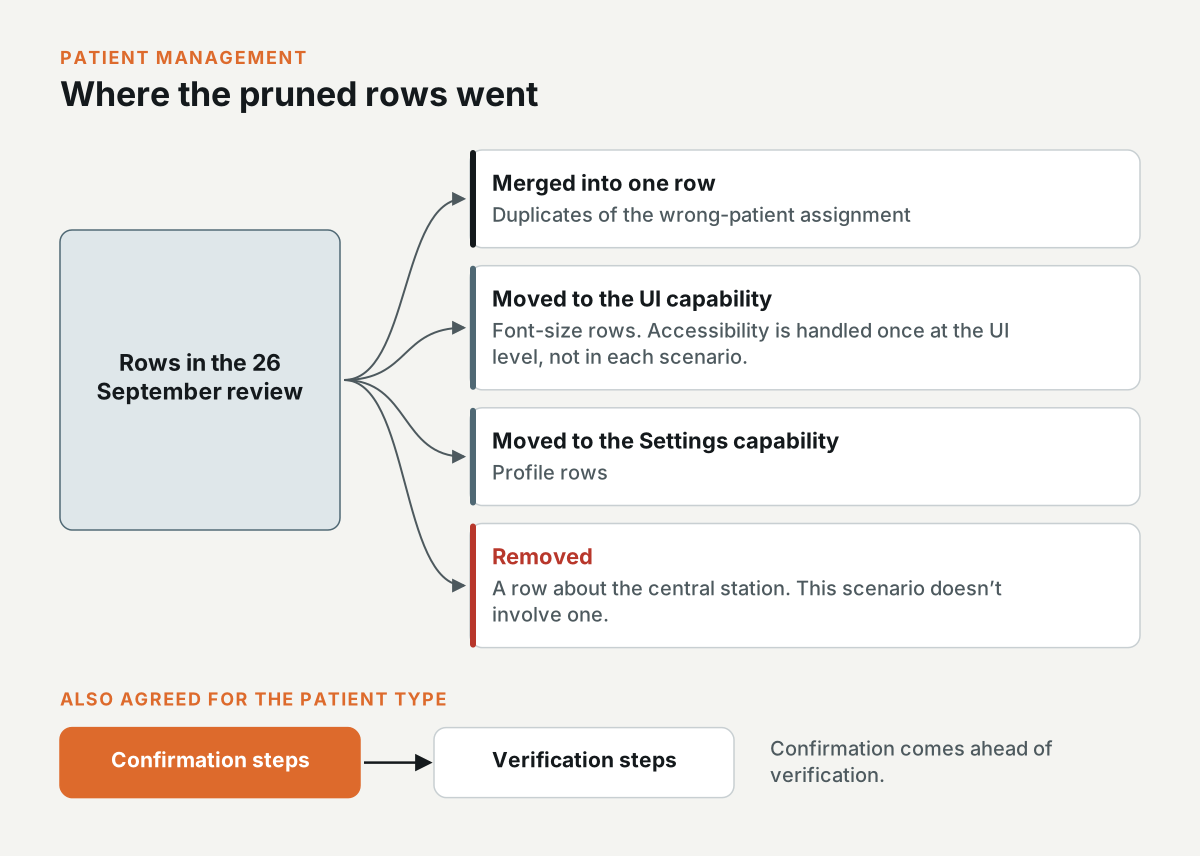
In the 26 September review, I pruned the rows. Duplicates of the wrong-patient assignment were merged into one. The font-size rows moved to the UI capability, because the team agreed that accessibility is handled once at the UI level and not in each scenario. The profile rows moved to the Settings capability, and I removed a row about the central station, because that scenario doesn't involve one.
The team also agreed that for the patient type, confirmation steps come ahead of verification steps.
Where the patient management work ended
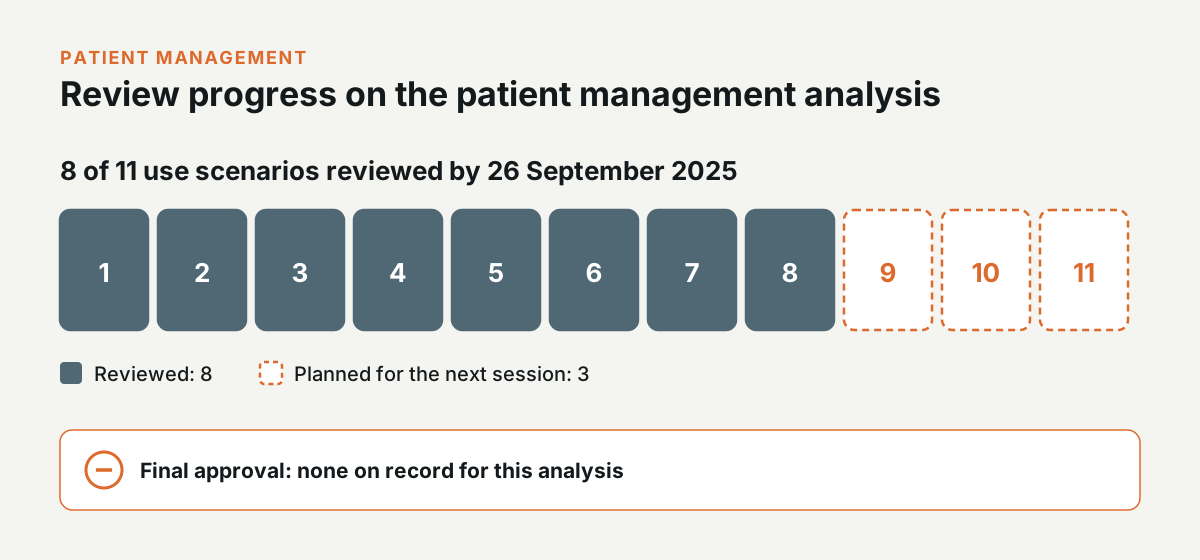
By 26 September 2025, eight of the 11 scenarios were reviewed, and the other three were planned for the next session. I can't point to a final approval for this analysis.
Use scenarios first
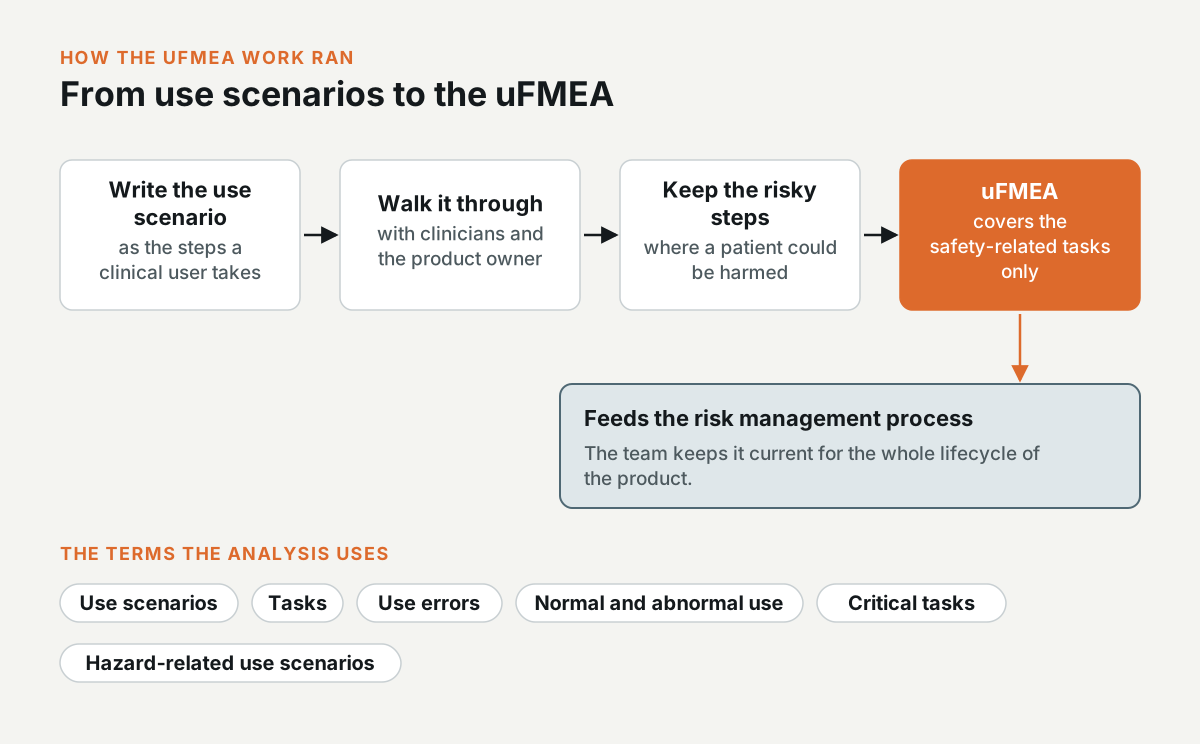
Each project started with the use scenarios. I wrote each one as the steps a clinical user takes, then walked the steps through with clinicians and the product owner. The uFMEA only covered the steps where a patient could be harmed, because the analysis is for safety-related tasks.
The terms come from IEC 62366-1: use scenarios, tasks, use errors, normal and abnormal use, critical tasks, and hazard-related use scenarios. The uFMEA feeds the risk management process, and the team keeps it current for the whole lifecycle of the product.
Classifying the use errors
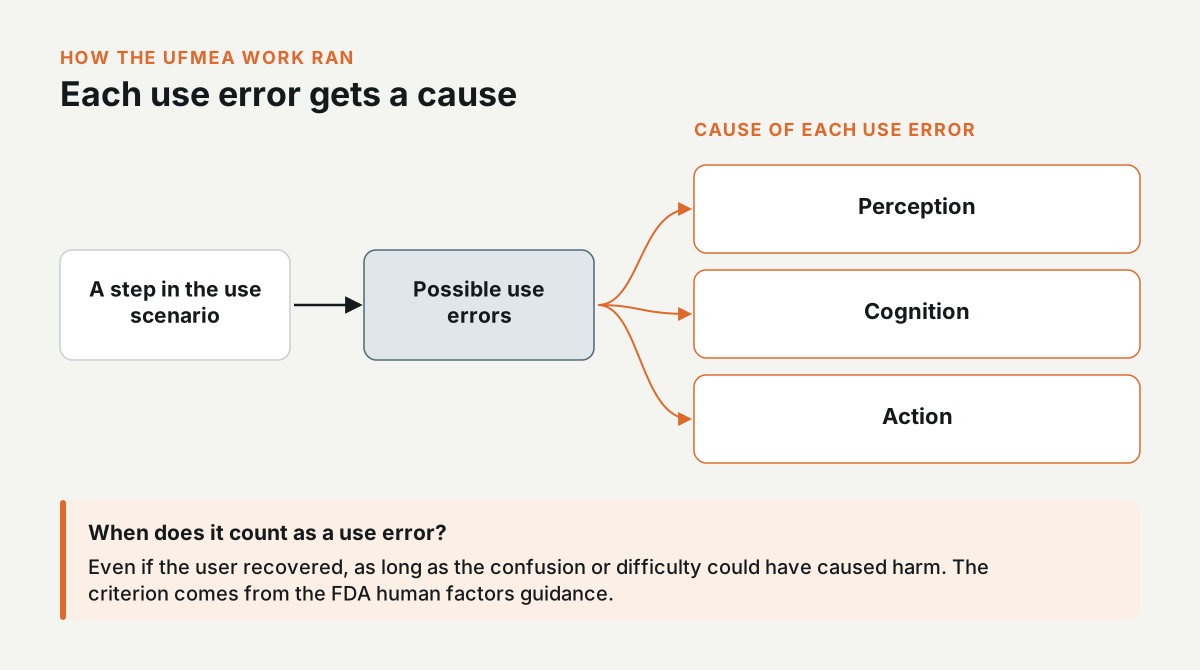
For each step, I wrote the possible use errors and classified the cause of each one as perception, cognition, or action. A use error counts even if the user recovered, as long as the confusion or difficulty could have caused harm. That criterion comes from the FDA human factors guidance.
Usability impact level and severity of harm
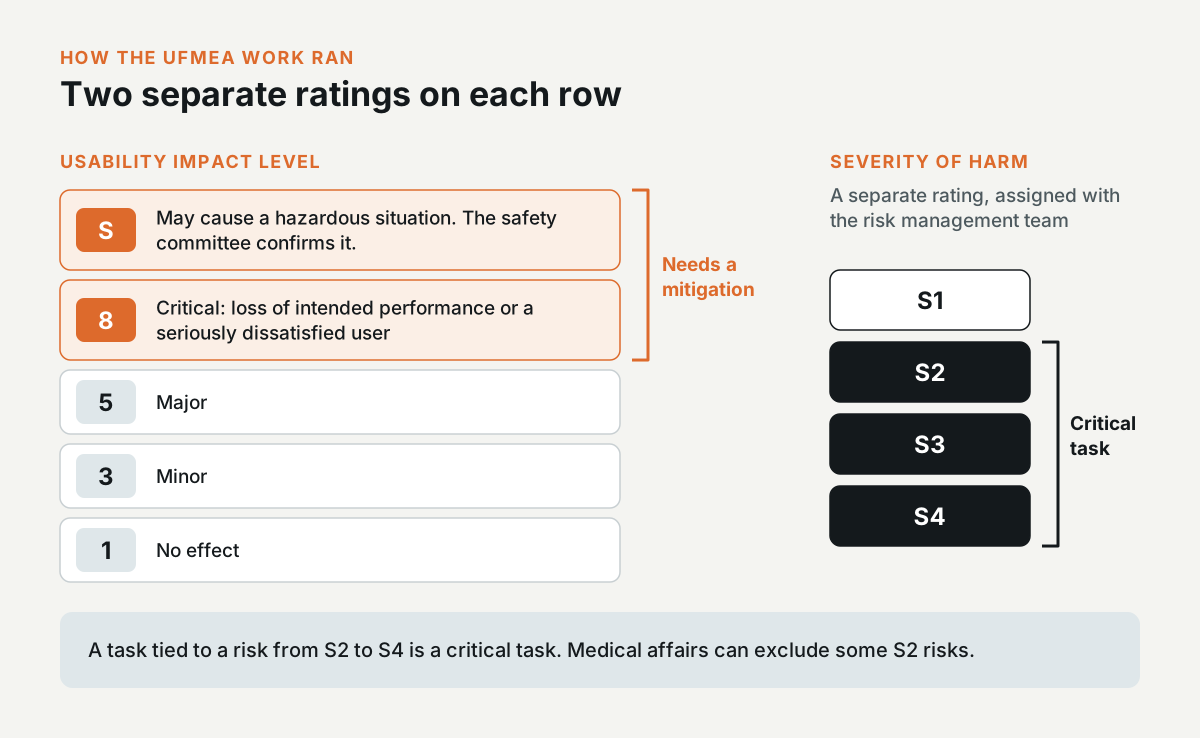
Each use error gets a usability impact level. S means the use error may cause a hazardous situation, and the safety committee confirms it. 8 is critical, which means a loss of intended performance or a seriously dissatisfied user. 5 is major, 3 is minor, and 1 means no effect. Every row rated S or 8 needs a mitigation.
The severity of harm is a separate rating from S1 to S4, and it's assigned together with the risk management team. A task tied to a risk from S2 to S4 is a critical task, and medical affairs can exclude some S2 risks.
Cross-functional reviews
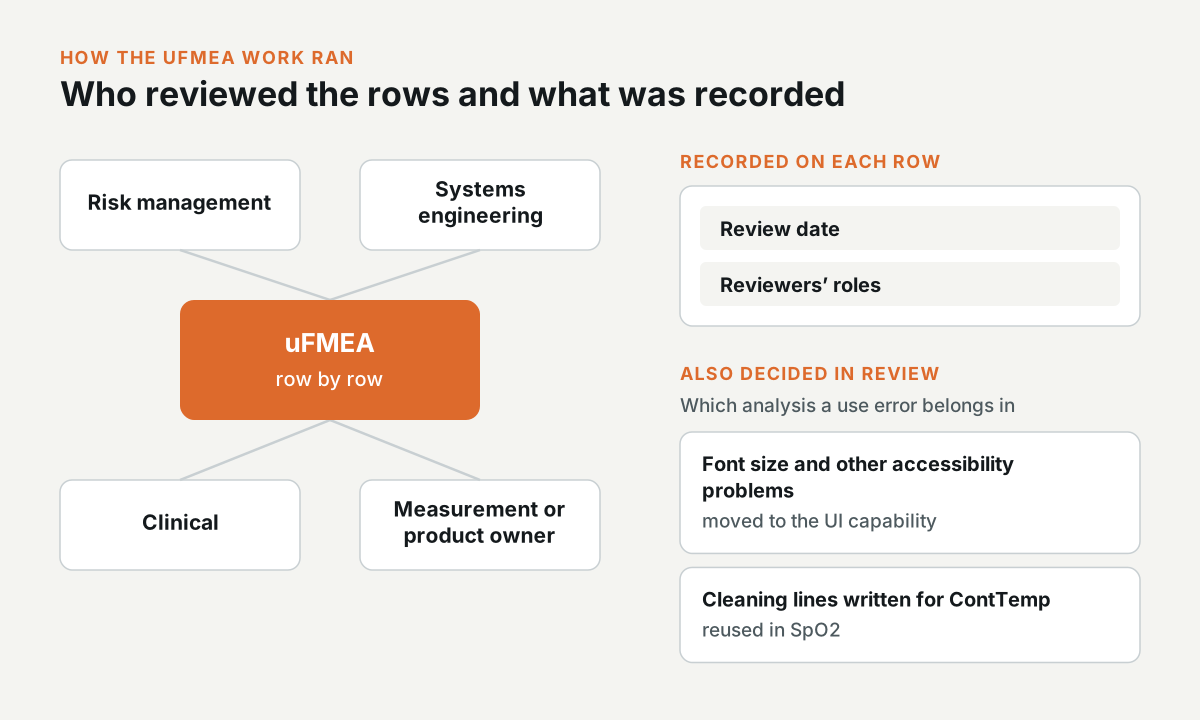
I took each uFMEA through reviews with risk management, systems engineering, clinical, and the measurement or product owner. The team went through the rows one by one, and I recorded the review date and the reviewers' roles against each row.
In the reviews, the team also decided which analysis a use error belongs in. Accessibility problems like font size moved to the UI capability, and the cleaning lines I wrote for ContTemp were reused in SpO2.
Traceability to requirements
The mitigations are written as “shall” statements. In SpO2, they point to existing requirements, and in ContTemp, a lot of them are new requirement requests. Each row also maps to a hazard-related use scenario in the risk analysis.
For the SpO2 legacy sensors, I matched each use error to the existing requirements that cover it, and marked each requirement as current or future. Across ContTemp, SpO2, and patient management, the three analyses came to about 200 line items.
Need this level of detail in your product?
Work through the hard product decisions early.
If you’re a product team, that can mean a focused design, system, or prototype project. If you’re hiring, it’s a chance to look closer at how I work across research, interfaces, and code.